
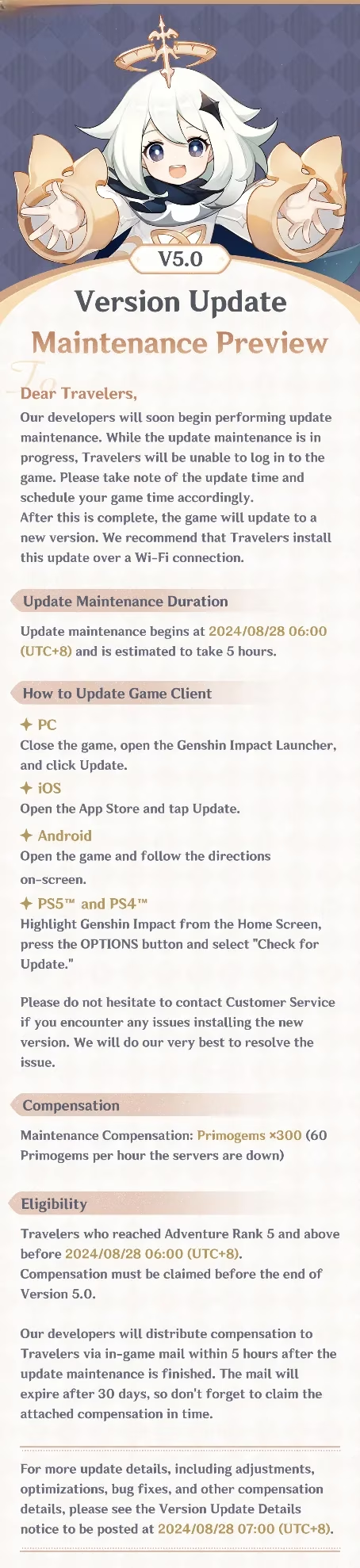
The Genshin Impact Version 5.0 update was a major milestone for HoYoverse, and its arrival on August 28, 2024, brought a carefully structured pre-installation and maintenance window. Although 2026 Travelers now explore a much later version of Teyvat, the Version 5.0 rollout remains a useful reference for understanding how large Genshin Impact updates are prepared, downloaded, and installed. The developers planned update maintenance to begin at 2024/08/28 06:00 (UTC+8), and the pre-installation function gave players an early opportunity to secure game files before the servers went offline. The central lesson was simple: storage space, timing, and system readiness mattered just as much as excitement for new content.

Pre-Installation Timing and Maintenance Window
The Version 5.0 maintenance was not a random downtime; it was a scheduled technical window designed to move the game from one version to the next. HoYoverse informed Travelers that developers were expected to begin update maintenance at 2024/08/28 06:00 (UTC+8). Players were encouraged to stay tuned to related game update information, because maintenance start times can affect when servers return and when new content becomes accessible.
-
⏰ Maintenance start: 2024/08/28 06:00 (UTC+8)
-
📥 Pre-installation: available before the maintenance period
-
🎯 Purpose: reduce waiting after maintenance and smooth the transition
-
🛡️ Best practice: begin the download early and keep the device connected to a stable network
The pre-installation function was especially valuable for players who wanted to avoid a long download once the update went live. By downloading core files ahead of time, Travelers could spend less time waiting and more time exploring. However, pre-installation also demanded enough free storage, which became the most important preparation step.
Storage Requirements and the Resource Package
Storage was the headline concern for Version 5.0. The reference guidance noted that the required space for PC pre-download was relatively large, approximately 26-38 GB, with the resource package occupying 16-23 GB. This larger footprint existed for a technical reason: it helped optimize update installation speed after pre-downloading on hard disk drives.
| Preparation Item | Approximate Size / Detail |
|---|---|
| PC pre-download space | 26-38 GB |
| Resource package | 16-23 GB |
| Maintenance start | 2024/08/28 06:00 (UTC+8) |
| Pre-installation availability | Before the update maintenance period |
If a device had limited storage space, the recommended approach was to reserve space for the resource package, approximately 16-23 GB, and wait until the version update maintenance period or after it to perform the update directly. This alternative avoided the larger temporary footprint of a full pre-download while still allowing the game to update once the new version was ready.

Device Preparation and System Specifications
A smooth Version 5.0 update depended on more than free space. Travelers needed to check their device storage and system specifications before maintenance began. A device that met the minimum requirements could still struggle if its storage was nearly full, if background applications consumed resources, or if the network connection was unstable.
Key preparation points included:
-
📱 Verify available storage against the 26-38 GB pre-download range and the 16-23 GB resource package.
-
💻 Confirm that the device meets the game's system specifications.
-
🔌 Keep the device powered or plugged in during large downloads.
-
📶 Use a stable internet connection to avoid corrupted or incomplete files.
-
🔄 Close unnecessary background programs to reduce installation conflicts.
-
📰 Follow official Genshin Impact channels for maintenance reminders and update news.
Official social platforms such as TikTok, X, Facebook, YouTube, HoYoLAB, and Reddit served as community hubs for updates and discussions. They were useful for confirming maintenance status, but the core preparation still happened on the device itself.
Why the Pre-Download Space Was So Large
The larger PC pre-download size was not simply a matter of new content. The developers explained that the space helped optimize update installation speed after pre-downloading on hard disk drives. In practice, this meant the launcher could stage files, verify them, and replace older assets more efficiently during maintenance. The resource package occupied 16-23 GB, while the full pre-download range reached 26-38 GB to accommodate the installation process.
For Travelers with limited storage, this distinction mattered. They could skip the full pre-download, reserve only the resource package space, and update directly during or after maintenance. That option was slower in terms of waiting until the update window, but it was safer for devices with tight storage capacity.
A Practical Version 5.0 Preparation Checklist
| ✅ Task | Details |
|---|---|
| Check free space | Ensure 26-38 GB for PC pre-download or 16-23 GB for the resource package. |
| Start pre-installation | Use the pre-installation function before maintenance begins. |
| Review system specs | Confirm the device can run the updated client. |
| Stabilize the network | Avoid interruptions during large downloads. |
| Monitor official news | Watch official channels for maintenance and update information. |
| Plan playtime | Expect server downtime at 2024/08/28 06:00 (UTC+8). |
Final Thoughts
In 2026, Version 5.0 is a historical chapter in Genshin Impact's live-service journey, but its pre-installation model still offers clear lessons. Major updates require planning, and storage is often the first bottleneck. The Version 5.0 guidance showed that players could choose between a full PC pre-download with a 26-38 GB footprint and a leaner direct update that reserved only the 16-23 GB resource package. The maintenance window at 2024/08/28 06:00 (UTC+8) also reminded the community that live games operate on scheduled technical timelines.
For modern Travelers, the same habits remain valuable: check device space, use pre-installation when possible, follow official announcements, and prepare for downtime. A well-prepared update experience is not just about faster downloads; it is about protecting the device, avoiding errors, and stepping into new content with confidence. The Version 5.0 rollout may belong to 2024, yet its emphasis on storage, maintenance timing, and system readiness continues to shape how Genshin Impact players approach every major version.